
If you’ve already nailed your content and keyword strategy, it’s time to dig deeper into the back-end of your website — and that’s where Technical SEO comes in.
Beginner’s Guide to Technical SEO ensures your website is structured in a way that search engines can crawl, index, and rank it effectively. In simple terms, it’s about making your site fast, mobile-friendly, and easy for Google to understand.
In this beginner’s guide, we’ll walk you through the basics you need to know to get started with technical SEO.
🔍 What is Technical SEO?

Technical SEO refers to the optimization of your website’s infrastructurehttps://www.onlinemalappuram.com/shahana/wp-admin/post.php?post=454&action=edit to help search engines like Google crawl and index your site more efficiently. It doesn’t involve content or link building — it’s about site speed, mobile usability, security, and proper coding.
Why is Beginner’s Guide to Technical SEO Important?
Even if your content is amazing, poor technical SEO can prevent it from ranking well. Here’s why it matters:
- ✅ Improves crawlability and indexability
- ✅ Boosts page load speed
- ✅ Enhances mobile experience
- ✅ Strengthens site security (HTTPS)
- ✅ Prevents duplicate content issues
Key Elements of Beginner’s Guide to Technical SEO
1. Website Speed Optimization
Fast-loading pages improve user experience and SEO rankings. Tools like Google PageSpeed Insights or GTmetrix help you analyze and improve speed.
Tips:
- Compress images
- Minify CSS, JavaScript, and HTML
- Use browser caching
- Choose a reliable hosting provider
2. Mobile-Friendly Design Beginner’s Guide to Technical SEO

With mobile-first indexing, Google prioritizes the mobile version of your site. Use responsive design to ensure your website looks great on all devices.
Check your site with Google’s Mobile-Friendly Test tool.
3. Secure Your Website with HTTPS
Security is a ranking factor. An SSL certificate (https://) ensures data is encrypted between your site and visitors.
If your site still uses HTTP, it’s time to migrate.
4. Fix Crawl Errors Beginner’s Guide to Technical SEO
Use Google Search Console to identify and fix crawl errors. Make sure your robots.txt and XML sitemap are set up correctly to guide search engines.
5. Optimize Site Structure & URL Hierarchy
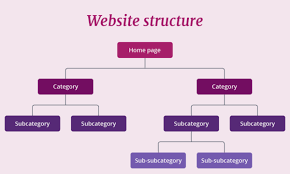
A clean site architecture helps both users and search engines. Use:
- Clear navigation menus
- SEO-friendly URLs (e.g.,
/blog/technical-seo-guide) - Internal linking to related pages
6. Avoid Duplicate Content
Duplicate pages confuse search engines. Use canonical tags, 301 redirects, and consistent URL structures to prevent this issue.
7. Schema Markup (Structured Data)

Add schema to your website’s code to help search engines understand the context of your content. This can also lead to rich snippets in search results (like star ratings or FAQs).
✅ Tools for Technical SEO
Here are a few beginner-friendly tools:
- Google Search Console
- Screaming Frog SEO Spider
- Ahrefs / SEMrush
- PageSpeed Insights
- Yoast SEO (for WordPress)
🧩 Final Thoughts
Technical SEO might sound intimidating at first, but getting the basics right can make a huge difference in your website’s performance and visibility on search engines.
Start by focusing on speed, mobile-friendliness, security, and crawlability — and you’ll be well on your way to SEO success!